An unfamiliar orange connector is rarely identifiable from one front-facing photo. A useful sourcing request combines clear photographs of the interface, housing, latch, wire entry, markings, and installation context with a few basic measurements and the supply scope you need.
Yeeparts can use that evidence to narrow candidate connector families or part numbers and continue the search with manufacturers and suppliers. This is a procurement-preparation process, not engineering approval. Photographs alone do not prove mating compatibility, electrical suitability, sealing performance, or safe use in a vehicle.
The short answer: send six views, a scale, and the required supply scope
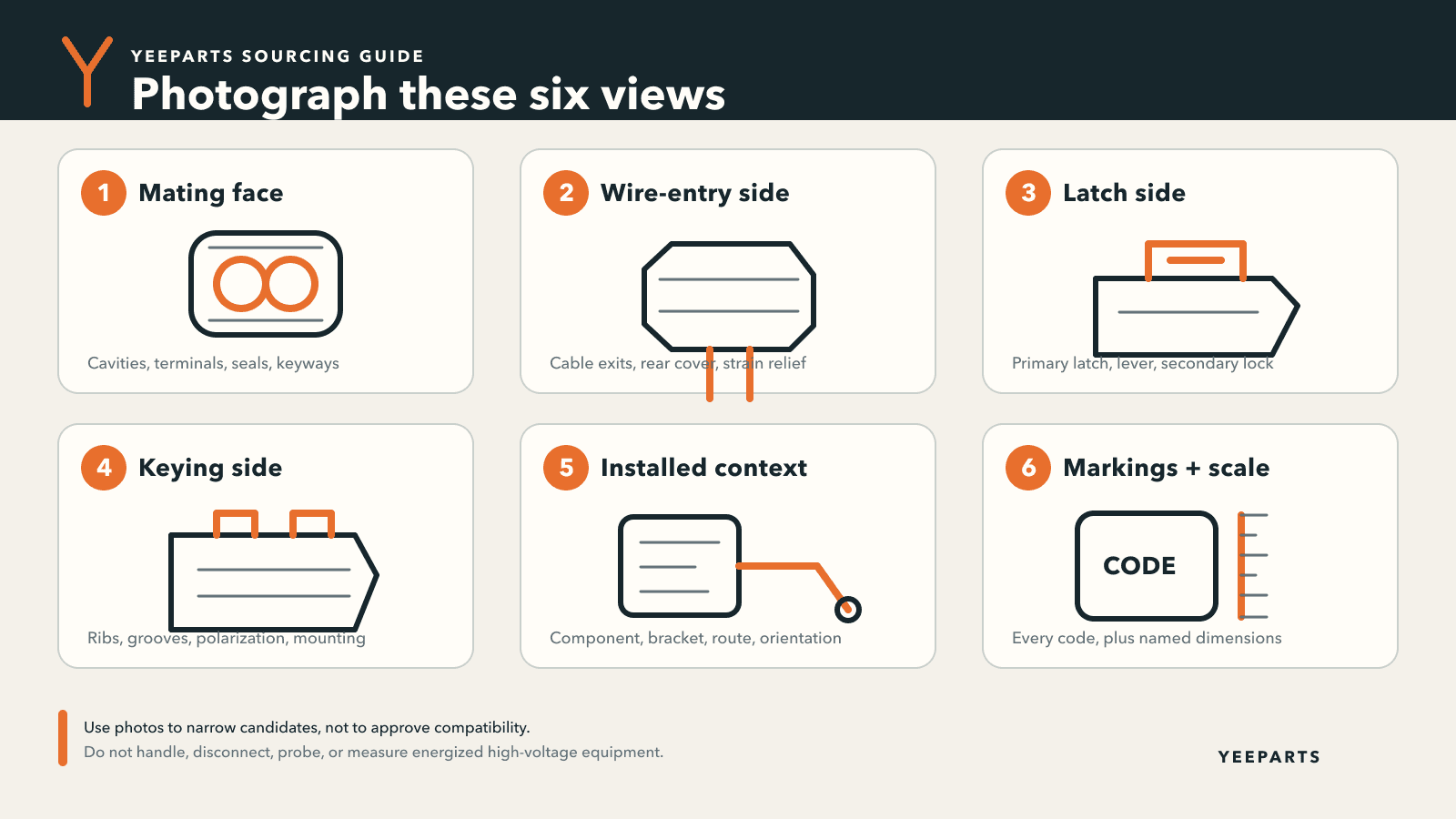
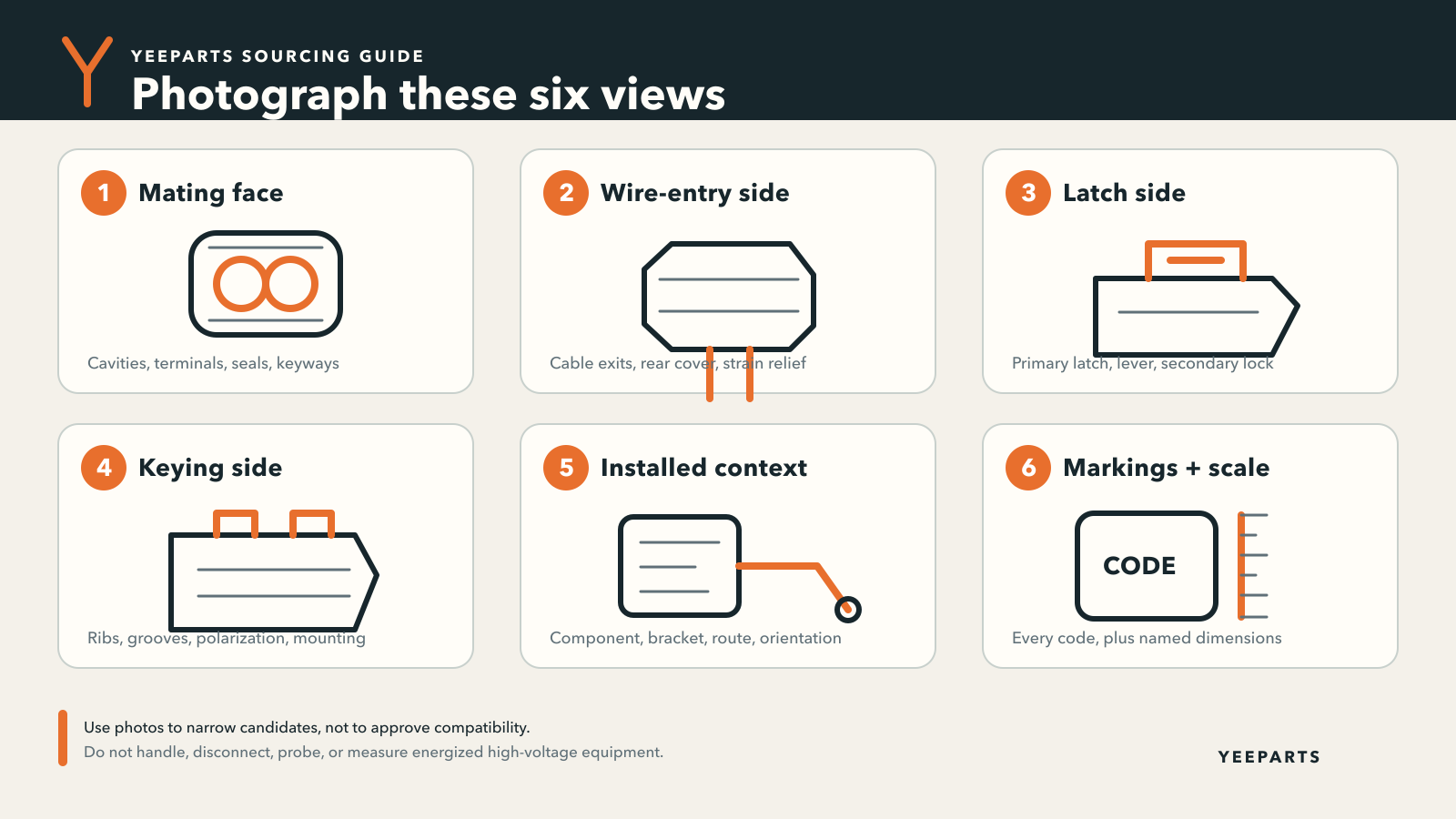
For the fastest first review, prepare these six photographs:
- Mating face: photograph the terminal cavities, keyways, seals, and contact layout straight on.
- Wire-entry side: show the cable exits, rear cover, strain relief, individual wire seals, and cable arrangement.
- Latch side: show the primary latch, lever, slide, CPA, or other secondary-lock feature.
- Opposite or keying side: capture ribs, slots, polarization features, mounting ears, and housing profile.
- Installed context: show where the connector is mounted and the nearby component, bracket, or cable route.
- Markings with scale: photograph every readable code beside a ruler or caliper reference.
Also state what you want to buy: a loose housing, contacts and seals, the mating half, a repair pigtail, a terminated cable assembly, or a complete replacement harness. The same interface can lead to very different quotations depending on this scope.
Why one photograph is usually not enough
Many automotive high-voltage connectors share visible features: orange housings, two power positions, shielding, sealing elements, and a secondary lock. Those similarities help define a broad category, but they do not establish an exact match.
Important differences may be hidden on the rear, underside, or mating key. A family can include several keying codes, cable-entry orientations, contact sizes, wire ranges, shield-termination methods, and mounting variants. Two housings that look similar in a cropped marketplace image may not mate, may use different terminals, or may require different assembly tooling.
The goal of the first RFQ is therefore not to make a visual guess look certain. It is to give the sourcing team enough evidence to build and verify a shortlist.
How to photograph each view
1. Mating face
Keep the camera parallel to the face and fill the frame without cropping the housing edges. Use even lighting so the cavity geometry, keyways, terminal shape, perimeter seal, and any smaller signal or interlock positions remain visible.
Do not force probes, measuring tools, or loose parts into a high-voltage interface. If the connector is installed on energized equipment or its state is uncertain, stop and have a qualified person isolate the system before handling it.
2. Wire-entry side
The rear view often distinguishes a field-assembled plug from an overmolded cable assembly. Show whether the wires leave separately or through one jacket, whether a shield is visible, and whether the rear cover or strain relief carries a code.
If the cable is safe to access, include the printed cable legend in a separate close-up. Do not cut, strip, or dismantle the cable only to obtain a photograph.
3. Latch and secondary-lock side
Photograph the complete locking mechanism in its current position. A primary latch, lever, connector-position-assurance feature, or other secondary lock can be a valuable family clue. Do not repeatedly operate an old or damaged lock for the photograph.
4. Opposite and keying side
Turn the connector over. Capture molded ribs, grooves, keying rails, color-coded inserts, mounting ears, and asymmetrical housing details. These features are often absent from catalogue thumbnails but useful when comparing manufacturer drawings.
5. Installed context
Take one wider image before removing anything. Show the connected component, mounting direction, nearby bracket, cable route, and enough of the vehicle or equipment to explain the application. Context can help distinguish an inlet, battery connection, power-distribution connection, heater feed, compressor connection, or charging-system interface without claiming a match from appearance alone.
6. Markings and scale
Clean only as much as is safe and necessary to read the housing. Photograph molded numbers, manufacturer marks, date codes, cavity labels, and cable printing. Add a ruler in the same plane as the connector or provide caliper readings separately.
Record dimensions in millimetres and label what each measurement represents. A scale in a perspective-heavy photo is less useful than a straight-on image plus clearly named dimensions.
Treat every clue as a clue, not proof
| Visible evidence | What it may help narrow | What it does not prove |
|---|---|---|
| Housing colour | Automotive high-voltage context | Voltage rating or exact family |
| Number of large cavities | Broad power-contact arrangement | Current rating or mating compatibility |
| Small auxiliary cavities | Possible interlock or signal positions | Circuit function or pin assignment |
| Keyways and ribs | Coding or polarization variant | Exact part number without documentation |
| Latch or lever shape | Connector-family shortlist | Correct engagement or retention performance |
| Cable diameter and legend | Candidate wire range and assembly type | Approved cable-to-terminal combination |
| Molded number or logo | Manufacturer or housing reference | Complete assembly number or current availability |
| Installed component | Application context | System-level electrical suitability |
A credible supplier should separate observed evidence from confirmed data. Final confirmation should come from manufacturer drawings, application specifications, part-number records, samples, or controlled fit and validation work performed by qualified parties.
State the supply scope before asking for a quote
“Need this connector” is ambiguous. Use one of the following scopes in the RFQ:
| Required supply | Information to add |
|---|---|
| Loose connector housing | Sex, keying, number of positions, and any visible housing code |
| Complete connector kit | Housing, terminals, seals, rear cover, secondary lock, and quantity |
| Mating half | Photos of the installed half and the component it connects to |
| Repair pigtail | Lead length, wire size if known, quantity, and whether ends should be sealed |
| Terminated cable assembly | End A, end B, cable length, routing constraints, and drawing status |
| Replacement harness | Vehicle or equipment context, branch layout, labels, lengths, and sample availability |
If you are unsure, say so. A supplier can compare the alternatives, but only if the request makes the uncertainty visible.
Measurements and application facts to prepare
After the photographs, add the facts that cannot be read reliably from an image:
- Overall housing width, height, and depth.
- Approximate mating-face dimensions.
- Cable outside diameter and conductor size, if safely known.
- Number and apparent size of power and auxiliary positions.
- Straight or angled cable exit.
- Equipment type and the component on each side of the connection.
- Existing manufacturer and part number, even if only partially readable.
- Required quantity, destination country, and target schedule.
- Sample availability and whether the current connector is damaged.
For a cable assembly, include the required finished length and how that length is measured. For a loose component kit, clarify whether contacts, seals, rear covers, and secondary locks must be included.
Questions for manufacturer and application review
Once a candidate family has been identified, the application still needs a separate technical review. Prepare the system requirements so the responsible manufacturer, integrator, or engineer can check them against the exact part-number documentation:
- Required voltage and continuous or peak current.
- Conductor material, cross-section, insulation, and shielding.
- Temperature, sealing, vibration, chemical, and routing conditions.
- Interlock or signal-circuit requirements.
- Mating cycles, mounting, serviceability, and assembly process.
- Applicable vehicle, equipment, customer, or regulatory requirements.
Yeeparts can help collect candidate documentation and coordinate sourcing questions, but does not approve a connector for an energized high-voltage system from photographs.
A manufacturer-specific example: why the exact variant matters
TE Connectivity's public HVA 1200 materials illustrate why a family name is only the beginning. The family page and product flyer describe multiple plug orientations, keying options, cable ranges, shielding, interlock, and component configurations. The corresponding application specification contains family-specific component, cable-preparation, crimping, assembly, and inspection requirements.
These documents are useful as an example of the evidence needed after visual narrowing; they are not universal instructions for other connector families.
- TE Connectivity HVA 1200 High-Voltage Interconnection System
- TE Connectivity HVA 1200 product flyer (PDF)
- TE Connectivity Application Specification 114-94518 (PDF)
Common identification mistakes
Searching by colour alone
Orange is a broad visual convention, not a unique identifier. Search and compare the interface, keying, lock, markings, and cable arrangement together.
Sending only the damaged face
Damage can hide the feature that differentiates one variant from another. Add the undamaged sides, rear, context, and any mating component available.
Assuming a housing number is the complete assembly number
A molded code may identify only one plastic component. Ask the supplier to confirm the complete bill of materials and the manufacturer documentation used for the match.
Omitting whether you need loose parts or an assembled lead
The housing alone may not solve the repair. State the required deliverable before comparing quotations.
Treating visual similarity as fit confirmation
Do not energize, force-mate, or approve a substitute because the photographs look similar. Complete the appropriate manufacturer and engineering checks first.
RFQ checklist
Before submitting, confirm that your request includes:
- Six clear photo views.
- Every readable marking.
- A ruler reference and named dimensions.
- The installed component and application context.
- The required supply scope.
- Quantity and destination country.
- Cable length and wire information, if applicable.
- Known electrical and environmental requirements for later technical review.
- Sample availability.
- A note identifying any uncertainty or damage.
You may also use our EV high-voltage connector selection checklist once the connector family is known, or browse high-voltage connectors, connector components, and cable assemblies for a starting point.
Frequently asked questions
Can Yeeparts identify the exact part number from one photo?
Sometimes a clear marking leads directly to a candidate, but one photograph is not a reliable basis for confirmation. Send the six views, dimensions, context, and supply scope so the team can narrow and document the shortlist.
Can I send photos after submitting the RFQ form?
Yes. The current RFQ form does not upload files directly. Submit the closest product or describe the unknown connector, then Yeeparts sales can request the photographs by follow-up email or WhatsApp.
What if the connector is damaged or partly missing?
Photograph the damage and all remaining features. If available, include the mating half, an undamaged connector from the same equipment, labels, drawings, or the connected component's part number.
Is a matching interface enough to approve a replacement?
No. Interface similarity is only one input. The exact part number, contacts, wire combination, ratings, environment, assembly process, and system requirements still need appropriate review.
Request a sourcing review
Use the Yeeparts RFQ form and include the connector's markings, measurements, application, required supply scope, quantity, and destination. Mention that you have the six-view photo set ready. The sales team can then arrange photo transfer and start a traceable candidate search without presenting a visual guess as a confirmed match.